

CiExchange Pay
Accept payments in crypto (USDT, USDC, ETH, BNB…) and reach new customers.
commission only
No hidden fees · No setup fees · You only pay when you get paid
Receive your funds in Mobile Money
Convert your crypto to XOF/XAF and receive on MTN, Moov, Orange or Wave, within minutes.
Why choose our crypto payment solution?
Easy Integration
API key generated automatically for integration in minutes.
Secure Payments
Every transaction is secured by the blockchain.
Dynamic Payment URL
Generate custom payment links for your customers.
Merchant Account Management
Track your transactions and receive funds directly to your wallet.
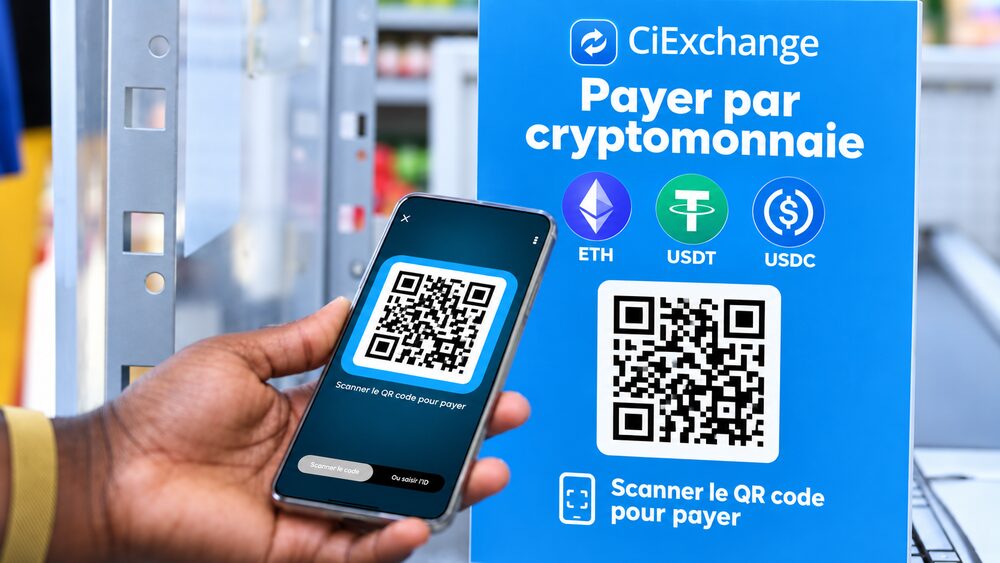
Scan to Pay In-Store
Accept crypto payments in your physical store
Generate a custom QR code for your shop. Customers scan and pay in crypto in seconds. Perfect for physical businesses looking to expand their payment options.
Custom QR code
Your logo, brand color and business name integrated into the QR code.
Instant payments
Funds are received within seconds on your account.
Free or fixed amount
Tips, donations or fixed-price products — the customer chooses or you set the amount.
How does it work?
Log in
Log in and create your merchant account in just a few clicks.
Create a payment link
From your dashboard, generate a link in a few clicks — no code, no technical skills needed.
Get paid
The customer pays, you get notified and funds arrive instantly in your wallet.
Supported Blockchains
We support multiple popular blockchains.
 Ethereum
 BSC
BSC Base
Base Polygon
 Optimism
 Avalanche
One link for all your collections
E-commerce
One link per order or product. Your customers pay in crypto from any country.
SaaS & Freelancers
Bill your international clients: single-use link, automatic receipt, webhook to activate subscriptions.
Donations & NGOs
Flexible amount with suggestion and min/max bounds. Downloadable receipt for each donor.
Physical stores
Scan to Pay QR code at the counter: customers scan and pay in seconds, no terminal needed.
1% vs. 3–5% elsewhere
Compare the real cost of getting paid.
| CiExchange Pay | Bank cards | International transfers | |
|---|---|---|---|
| Fees | 1% per transaction | ~3% | Up to 5% |
| Subscription | None | Often paid | High fixed fees |
| Payout speed | A few seconds | 24–72 hours | Several days |
| Coverage | Worldwide | Depends on card and country | Depends on corridors |
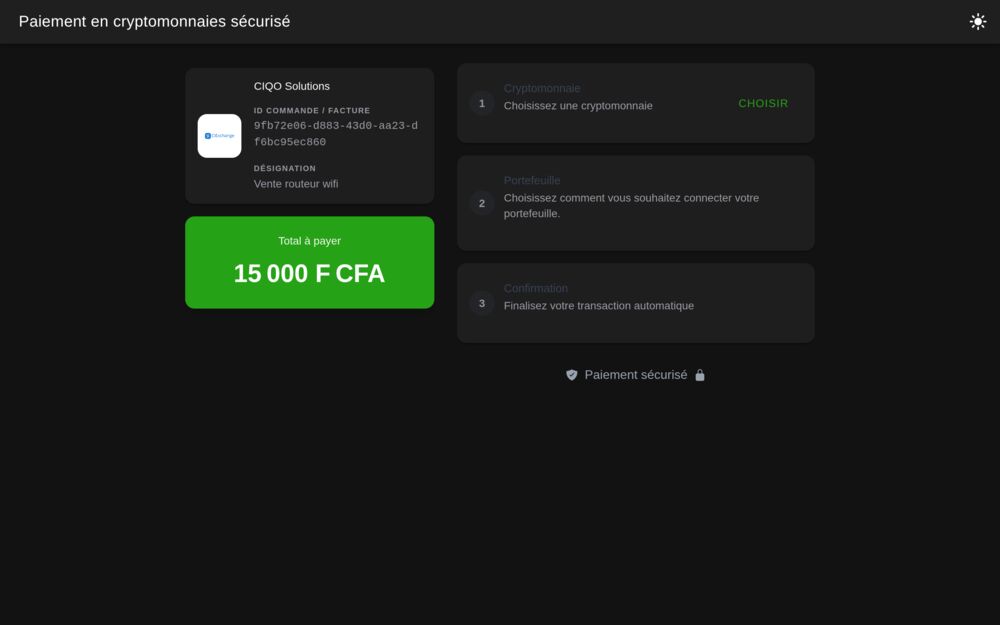
See for yourself
Here is what your customers see: amount, accepted cryptos, payment in a few clicks.
Integrate in an afternoon
One REST API, signed webhooks and a test mode. Create your first payment link in a single call.
Frequently Asked Questions
CiExchange Pay takes a 1% commission on each completed transaction. No setup fees, no monthly subscription. You only pay when you get paid.
No. Your customers only need a crypto wallet (MetaMask, Trust Wallet, WalletConnect…) with sufficient funds. They don't need to create a CiExchange account.
You can accept stablecoins (USDT, USDC) and/or native cryptos (ETH, BNB…) on multiple blockchains: Ethereum, BNB Chain, Base, Polygon, Optimism, Avalanche and others.
Yes. Once you receive USDT in your wallet, you can exchange them directly via CiExchange exchange to instantly receive XOF or XAF to your Mobile Money account (MTN, MOOV, Orange, Wave…) in supported countries.
No. The 1% commission is automatically deducted by the smart contract from the amount sent by the customer (amount received = amount paid − 1%). To pass these fees on to the customer, increase the payment link amount accordingly (e.g. price ÷ 0.99). There is no automatic 'fees on top' option yet.
In crypto mode, your net share arrives instantly and automatically to your wallet address — nothing to do. In Mobile Money mode, the net share is held in a secure vault then paid out in XOF/XAF to your Mobile Money number on request from your dashboard (payout button).
Yes. Set any URL you want (confirmation page, next signup step…) in the redirect_url field when creating the link, or via the API. After a successful payment, the success page automatically sends the customer to this URL. Each link can have its own URL, editable while the payment is pending.
Yes. Each confirmed payment generates a public receipt page with the amount, the crypto used, the transaction hash (verifiable on the blockchain explorer) and your business info (name, logo, color). The customer can download it as a PNG image. Customize your logo and color from your merchant account. Note: no automatic email is sent to the customer for now.
Three channels: instant push and WhatsApp notifications, real-time dashboard, and server webhook (signed payment-completed event) to any URL you choose to automate your processes, e.g. activating a subscription. Configure your webhook URLs from your merchant account.
Yes. Each link can be created in test mode to simulate the full flow with no real funds, then switched to production. Merchant accounts not yet validated (KYB) can only create test-mode payments.
Yes, with flexible amount: the customer freely adjusts the amount on the payment page. The amount you set then acts as a pre-filled suggestion, not an enforced total. To frame donations, add a minimum and/or maximum: any out-of-range payment is rejected. Ideal for donations, tips and fundraisers.
Ready to accept cryptocurrencies?
Create your merchant account and start accepting crypto payments today!